Yeah, yeah .. I know, it’s weekend. But I usually can think much better when no one is rattling my cage. So I had another look at my replication problems.

  1. Don’t you never ever change InnoDB settings when migrating between hardware, because InnoDB is rather sensitive regarding those parameters.
  2. When you’re setting up the replication (don’t ask me why) and copying over the database to the second replication partner, be aware if you’re using wild cards you’re gonna get seriously bitten in the back.

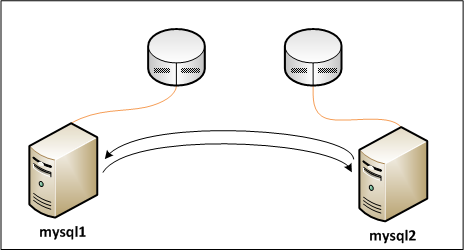
Now, let’s look at the constellation.

mysql-nodes

mysql-nodes

As you can see on the graph above (hah, sometimes Visio is rather useful 😛 ), we do have two MySQL nodes, each serving as master (as in we’re doing “normal” master-master replication).

Here’s what we’re gonna do first:

  1. Setup the user mysql_repl for mysql%.home.barfoo.org, granting REPLICATION SLAVE.
  2. Setup the user mysql_slave for mysql1.home.barfoo.org and mysql2.home.barfoo.org, also granting REPLICATION SLAVE.

Afterwards, we’re gonna copy the mysql database (either via tar and scp, or just via rssh – which is rsync via ssh) to both nodes.

1
2
3
4
5
6
mysql1> GRANT REPLICATION SLAVE ON *.* TO
  'mysql_slave'@'mysql1.home.barfoo.org' IDENTIFIED BY 'hans';
mysql1> GRANT REPLICATION SLAVE ON *.* TO
  'mysql_slave'@'mysql2.home.barfoo.org' IDENTIFIED BY 'hans';
mysql1> GRANT REPLICATION SLAVE ON *.* TO
  'mysql_repl'@'mysql%.home.barfoo.org' IDENTIFIED BY 'hans';

Now, then lets copy the database over to the second node, and start the MySQL daemon there too.

 1
 2
 3
 4
 5
 6
 7
 8
 9
10
11
12
13
14
15
16
17
18
19
20
21
mysql1> show master statusG;
*************************** 1. row ***************************
            File: binlog.000001
        Position: 354
    Binlog_Do_DB:
Binlog_Ignore_DB:
1 row in set (0.00 sec)

ERROR:
No query specified

mysql2> show master statusG;
*************************** 1. row ***************************
            File: binlog.000005
        Position: 354
    Binlog_Do_DB:
Binlog_Ignore_DB:
1 row in set (0.00 sec)

ERROR:
No query specified

Ok, we need these statements to start the replication.

 1
 2
 3
 4
 5
 6
 7
 8
 9
10
11
12
13
14
15
16
17
18
19
20
21
22
23
24
25
26
27
28
29
30
31
32
33
34
35
36
37
38
39
40
41
42
43
mysql1> CHANGE MASTER TO MASTER_HOST="mysql2.home.barfoo.org",
  MASTER_PORT=3306, MASTER_USER="mysql_slave", MASTER_PASSWORD='hans',
  MASTER_LOG_FILE='binlog.000005', MASTER_LOG_POS=354;
mysql1> START SLAVE;
mysql1> SHOW SLAVE STATUSG;
*************************** 1. row ***************************
             Slave_IO_State: Waiting for master to send event
                Master_Host: mysql2.home.barfoo.org
                Master_User: mysql_slave
                Master_Port: 3306
              Connect_Retry: 60
            Master_Log_File: binlog.000005
        Read_Master_Log_Pos: 354
             Relay_Log_File: relay.000002
              Relay_Log_Pos: 232
      Relay_Master_Log_File: binlog.000005
           Slave_IO_Running: Yes
          Slave_SQL_Running: Yes
            Replicate_Do_DB:
        Replicate_Ignore_DB:
         Replicate_Do_Table:
     Replicate_Ignore_Table:
    Replicate_Wild_Do_Table:
Replicate_Wild_Ignore_Table:
                 Last_Errno: 0
                 Last_Error:
               Skip_Counter: 0
        Exec_Master_Log_Pos: 354
            Relay_Log_Space: 232
            Until_Condition: None
             Until_Log_File:
              Until_Log_Pos: 0
         Master_SSL_Allowed: No
         Master_SSL_CA_File:
         Master_SSL_CA_Path:
            Master_SSL_Cert:
          Master_SSL_Cipher:
             Master_SSL_Key:
      Seconds_Behind_Master: 0
1 row in set (0.00 sec)

ERROR:
No query specified

As you can see, the replication started without errors and didn’t fail. The log also confirms this:

1
2
3
4
5
6
090216  9:08:30 [Note] Slave SQL thread initialized, starting replication
  in log 'binlog.000005' at position 354, relay log
  '/var/lib/mysql/slave3/relay.000001' position: 4
090216  9:08:30 [Note] Slave I/O thread: connected to
  master 'mysql_slave@mysql2.home.barfoo.org:3306',  replication started in
  log 'binlog.000005' at position 354

Now then, let’s try using the other replication user.

 1
 2
 3
 4
 5
 6
 7
 8
 9
10
11
12
13
14
15
16
17
18
19
20
21
22
23
24
25
26
27
28
29
30
31
32
33
34
35
36
37
38
39
40
41
42
43
44
45
mysql1> STOP SLAVE;
mysql1> RESET SLAVE;
mysql1> CHANGE MASTER TO MASTER_HOST="mysql2.home.barfoo.org",
  MASTER_PORT=3306, MASTER_USER="mysql_repl", MASTER_PASSWORD='hans',
  MASTER_LOG_FILE='binlog.000005', MASTER_LOG_POS=354;
mysql1> START SLAVE;
mysql1> SHOW SLAVE STATUSG;
*************************** 1. row ***************************
             Slave_IO_State: Connecting to master
                Master_Host: mysql2.home.barfoo.org
                Master_User: mysql_repl
                Master_Port: 3306
              Connect_Retry: 60
            Master_Log_File: binlog.000001
        Read_Master_Log_Pos: 354
             Relay_Log_File: relay.000001
              Relay_Log_Pos: 98
      Relay_Master_Log_File: binlog.000001
           Slave_IO_Running: No
          Slave_SQL_Running: Yes
            Replicate_Do_DB:
        Replicate_Ignore_DB:
         Replicate_Do_Table:
     Replicate_Ignore_Table:
    Replicate_Wild_Do_Table:
Replicate_Wild_Ignore_Table:
                 Last_Errno: 0
                 Last_Error:
               Skip_Counter: 0
        Exec_Master_Log_Pos: 354
            Relay_Log_Space: 98
            Until_Condition: None
             Until_Log_File:
              Until_Log_Pos: 0
         Master_SSL_Allowed: No
         Master_SSL_CA_File:
         Master_SSL_CA_Path:
            Master_SSL_Cert:
          Master_SSL_Cipher:
             Master_SSL_Key:
      Seconds_Behind_Master: NULL
1 row in set (0.00 sec)

ERROR:
No query specified

Now, again the log tells us why:

1
2
3
4
090216  9:30:01 [ERROR] Slave I/O thread: error connecting to master
  'mysql_repl@mysql2.home.barfoo.org:3306': Error: 'Access denied for user
  'mysql_repl'@'mysql2.home.barfoo.org' (using password: YES)'  errno: 1045
  retry-time: 60  retries: 86400

At this point, I don’t have the slightest clue, why MySQL is behaving this way. I’m completely out of ideas, as to why so I’m just gonna do it using what I described in turn #1.