Well, I wanted independent SpamAssassin Bayes databases per user (different users, different preferences). For that, RoundCube already set up the Junk folder. However, I wanted the ability (for myself, as well for my other users) to individually mark messages as either Spam or Ham.

 RoundCube: Inbox view

RoundCube: Inbox view

Now, as I said before I wanted a trivial way to mark messages as Spam or Ham (without using the command line each time).
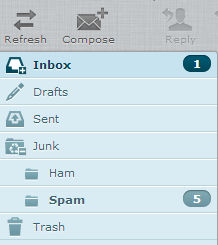
 RoundCube: Adjusted Inbox View

RoundCube: Adjusted Inbox View

Now, that was the mailbox setup part. Now we do have to do some command line foo (yeah, it’s still necessary) to actually learn the mails as spam or ham. First we need a script, which scans the Maildir for each domain/user separately, and then creates the bayes database.

 1
 2
 3
 4
 5
 6
 7
 8
 9
10
11
12
13
14
15
16
17
18
19
20
21
22
23
24
25
26
27
28
29
30
31
32
33
34
35
36
37
38
39
40
41
#!/bin/bash

# Script, which allows per-user bayes db's for a dovecot virtual user
# setup. sa-learn parses a set amount of folders (.Junk.Spam and .Junk.Ham) for
# Ham/Spam and adds it to the per-user db.

MAIL_DIR=/var/mail
SPAMASS_DIR=/var/lib/spamassassin
SPAM_FOLDER=".Junk.Spam"
HAM_FOLDER=".Junk.Ham"

# get all mail accounts
for domain in $MAIL_DIR/*; do
        for user in $MAIL_DIR/${domain##*/}/*; do
                mailaccount=${user##*/}
                dbpath=$SPAMASS_DIR/${domain##*/}/$mailaccount
                spamfolder=${domain}/${mailaccount}/Maildir/$SPAM_FOLDER
                hamfolder=${domain}/${mailaccount}/Maildir/$HAM_FOLDER

                if [ -d $spamfolder ] ; then
                        [ ! -d $dbpath ] && mkdir -p ${dbpath}
                        echo "Learning Spam from ${spamfolder} for user ${mailaccount}"
                        nice sa-learn --spam --dbpath ${dbpath}/bayes
                                --no-sync ${spamfolder}
                fi

                if [ -d $hamfolder ] ; then
                        echo "Learning Ham from ${hamfolder} for user ${mailaccount}"
                        nice sa-learn --ham --dbpath ${dbpath}/bayes
                                --no-sync ${hamfolder}
                fi

                if [ -d $spamfolder -o -d $hamfolder ] ; then
                        nice sa-learn --sync --dbpath $dbpath

                        # Fix dbpath permissions
                        chown -R mail.mail ${dbpath}
                        chmod 700 ${dbpath}
                fi
        done
done

This script is based on work from nesono and workaround.org. Anyhow, the script will scan each user folder (you might need to adjust the MAIL_DIR and SPAMASS_DIR variable, depending on where your MAIL_DIR is located.

Next, we need to adjust the SPAMD options to use the virtual-config-dir (that’s the SPAMD name for this).

 1
 2
 3
 4
 5
 6
 7
 8
 9
10
11
--- spamassassin.orig   2013-06-19 19:49:30.000000000 +0200
+++ spamassassin        2013-06-19 19:18:07.000000000 +0200
@@ -14,7 +14,7 @@
 # make sure --max-children is not set to anything higher than 5,
 # unless you know what you're doing.

-OPTIONS="--create-prefs --max-children 5 --helper-home-dir"
+OPTIONS="--create-prefs --max-children 5 --helper-home-dir --virtual-config-dir=/var/lib/spamassassin/%d/%l -x -u mail"

 # Pid file
 # Where should spamd write its PID to file? If you use the -u or

As you can see, I basically appended the following to the OPTIONS variable: –virtual-config-dir=/var/lib/spamassassin/%d/%l -x -u mail

Now, here’s a couple of pointers:

–virtual-config-dir=pattern This option specifies where per-user preferences can be found for virtual users, for the -x switch. The pattern is used as a base pattern for the directory name. Any of the following escapes can be used:

%u – replaced with the full name of the current user, as sent by spamc. %l – replaced with the ’local part’ of the current username. In other words, if the username is an email address, this is the part before the “@” sign. %d – replaced with the ‘domain’ of the current username. In other words, if the username is an email address, this is the part after the “@” sign. %% -- replaced with a single percent sign (%).

-u username, –username=username Run as the named user. If this option is not set, the default behaviour is to setuid() to the user running “spamc”, if “spamd” is running as root.

Note: “–username=root” is not a valid option. If specified, “spamd” will exit with a fatal error on startup.

Now, only a small adjustment is still needed. In order for the inbound mails to be scanned with the per-user db’s, you need to adjust postfix’s master.cf file, to run spamc with the per-user db.

 1
 2
 3
 4
 5
 6
 7
 8
 9
10
11
--- master.cf.orig      2013-06-19 19:56:57.000000000 +0200
+++ master.cf   2013-06-19 19:57:09.000000000 +0200
@@ -115,7 +115,7 @@

 # dovecot mail delivery
 dovecot   unix  -       n       n       -       -       pipe
-  flags=DRhu user=vmail:mail argv=/usr/lib/dovecot/deliver -d ${recipient}
+  flags=DRhu user=vmail:mail argv=/usr/bin/spamc -u ${recipient} -e /usr/lib/dovecot/deliver -f ${sender} -d ${recipient}

 amavis unix    -       -       -       -       2       smtp
         -o smtp_data_done_timeout=1200

After that’s done (and a restart of postfix, spamassassin and dovecot) you should be the proud owner of a per-user dovecot/postfix/spamassassin implementation.